A dotloop alternative, compared job by job
Every statement about dotloop on this page is a quotation from dotloop’s own website, with the date we read it. Everything else is about our software.
Published August 8, 2026 · Updated October 19, 2026
Looking for a dotloop alternative? Transaction management is the first piece of software most agents pay for, and it is the piece that quietly decides how much retyping the rest of your week involves — so it is worth knowing what you would actually be swapping.
This page is written by Real Deal Pro, so read it the way you would read any comparison published by one of the two parties. What we can promise is the method: we never characterise dotloop’s product. Every statement about dotloop below is a verbatim quotation from dotloop’s own website with the date we loaded the page, and every claim about Real Deal Pro sits in its own block so the two can never be confused. Where dotloop publishes nothing about a job, we say nothing about them and simply describe the job.
dotloop
$34.99/mo
Agent plan card read "$34.99/MONTH".
Real Deal Pro
$0/mo
Free plan — up to 3 active deals and 100 clients, contract generation and e-signatures included. Paid plans start at $49/mo billed annually.
1. Getting the contract signed and back
An offer is only real once it is signed. The job is to get a document in front of a buyer, a seller and sometimes a co-operating agent, collect legally valid signatures in the right order, and end up with an executed PDF plus a record of who signed what and when.
When signing lives in a different tool from the deal, the same names, addresses and dates get keyed in twice — once to build the document and once to set up the signing — and the executed copy comes back to an inbox instead of to the file it belongs in.
What dotloop’s own pages say
“Secure and Legal eSignatures”
— www.dotloop.com/products/plans-pricing, read October 19, 2026
“In-Person Signing”
— www.dotloop.com/products/plans-pricing, read October 19, 2026
“Audit Trail”
— www.dotloop.com/products/plans-pricing, read October 19, 2026
In Real Deal Pro
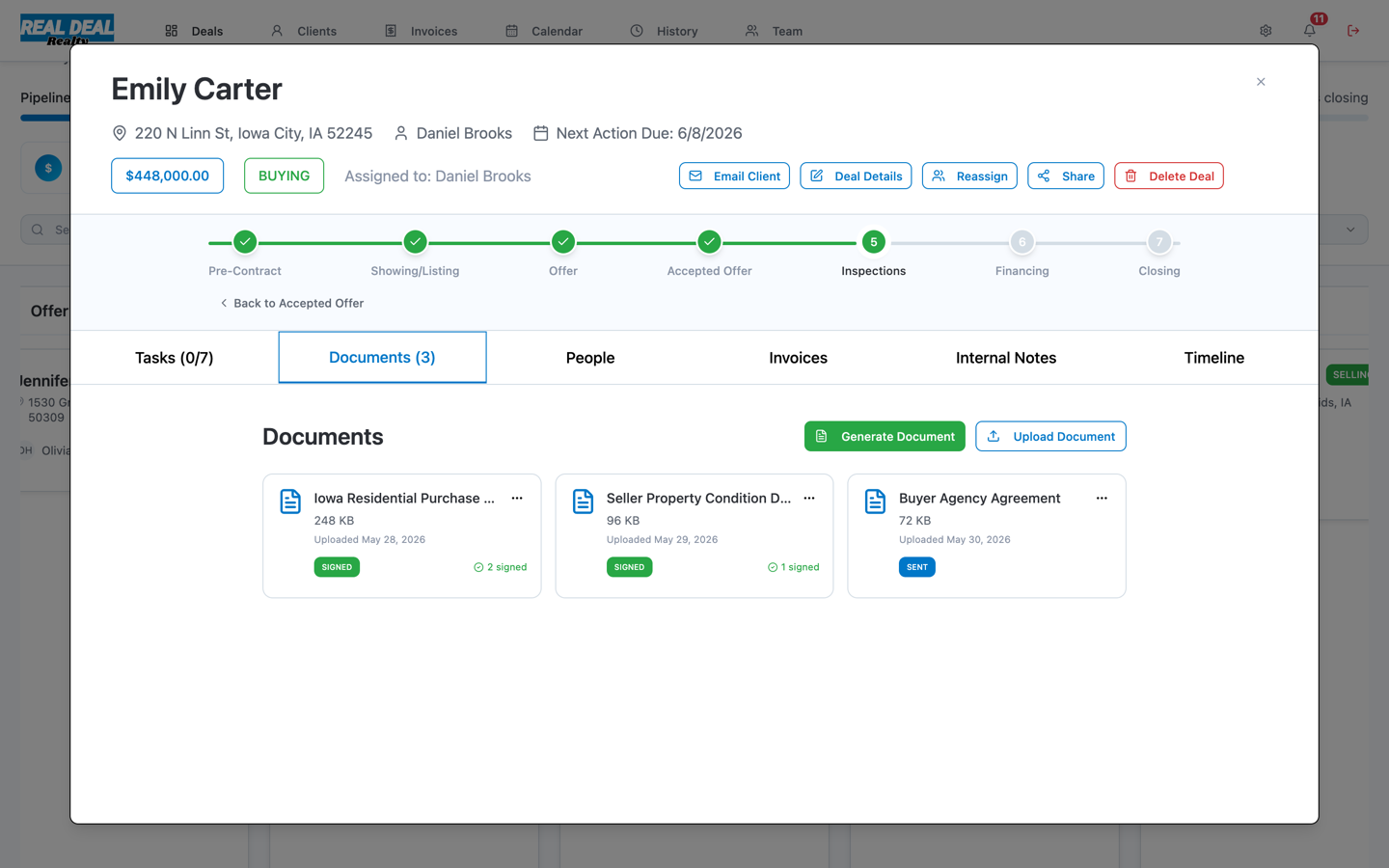
- E-signature is part of the deal, not a separate product. You send from the document already attached to the deal, and the executed copy lands back on that deal with its audit history.
- Sending for signature is included on the Free plan — it is not gated behind an upgrade.
2. Where the client lives between deals
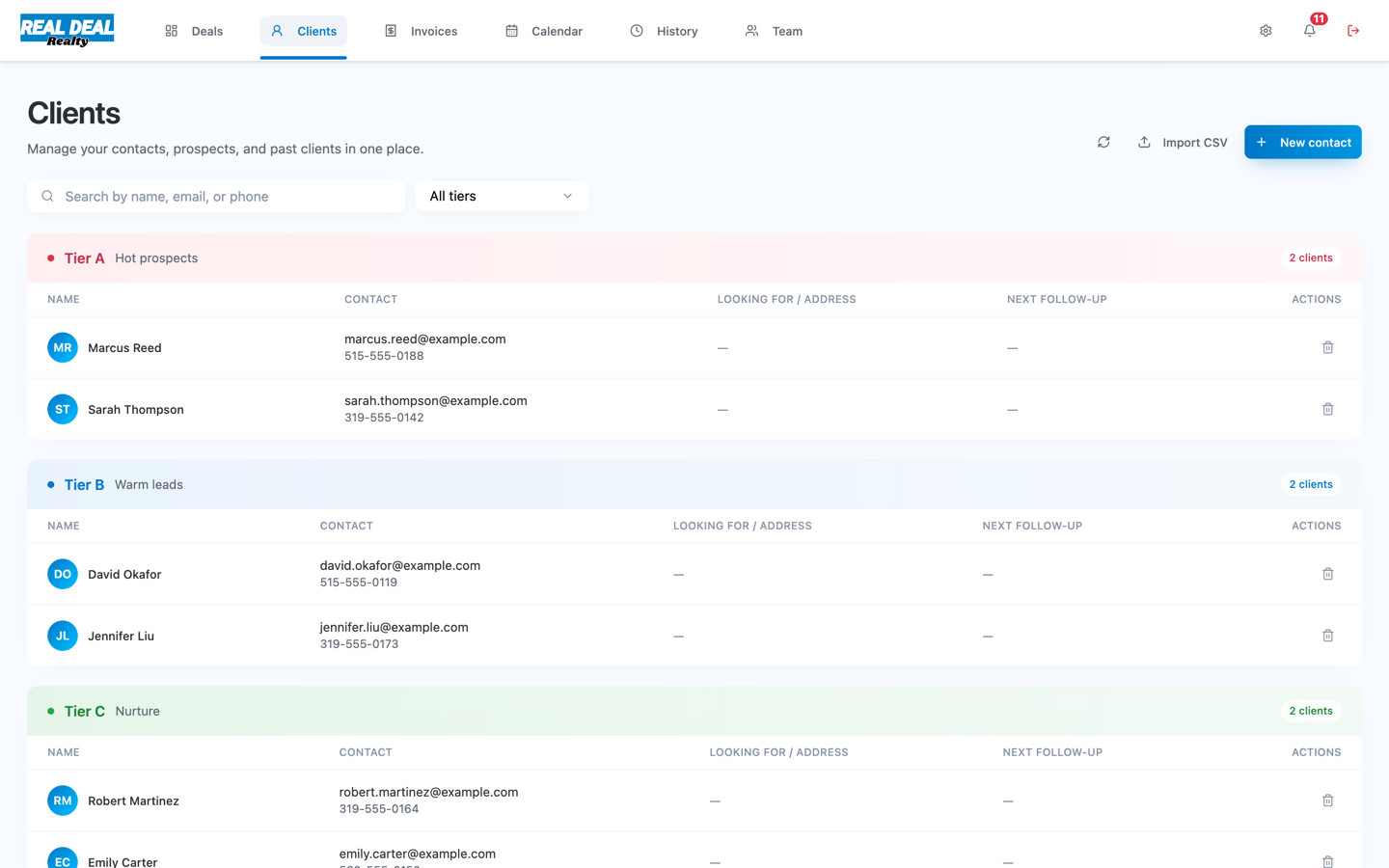
Most of your book is not in a transaction right now. Somebody who toured in March buys in October. The job is a place where people live between deals — sorted by how warm they are, with the history attached — so a follow-up is a decision rather than an archaeology project.
This is the job that most often ends up in a second subscription, and the split is expensive in a way that never shows up on an invoice: the contact record and the deal record stop agreeing, and you start trusting neither.
In Real Deal Pro
- Clients sit in a tiered CRM — Hot, Warm, Nurture, Long-term — in the same workspace as the deals, so the person and the transaction are one record.
- Bring your existing book in by CSV, and turn any contact into a deal in one click. Two columns are worth naming because they are the ones that carry structure rather than text: the column holding your groupings is pre-selected when its header reads Tags, Lists, Groups, Labels or Segments — point it at any other column if yours is named something else — and you pick whether the cell splits on a semicolon, a pipe or a comma, so the groupings arrive as categories. A Tier, Rating or Grade column reading A, B, C, D or a past-client marker sets the tier.
- The Free plan holds up to 100 clients alongside its 3 active deals.
3. Filling in the forms
A state purchase agreement runs to dozens of fields, and you have already typed the buyer’s name, the property address and the price at least twice before you reach it. The job is to enter each fact once and have every document that needs it fill itself in.
What dotloop’s own pages say
“Document Templates”
— www.dotloop.com/products/plans-pricing, read October 19, 2026
“MLS and Association Feeds”
— www.dotloop.com/products/plans-pricing, read October 19, 2026
“Robust Document Editor”
— www.dotloop.com/products/plans-pricing, read October 19, 2026
In Real Deal Pro
- Map a template once — drag each field onto the form — and every future deal fills that form in from the deal record. Your state’s forms work anywhere; nothing about the mapping is Iowa-specific.
- A form arrives as a PDF: one file per upload, up to 10MB.
- Contract generation is included on the Free plan.
4. Keeping the deal on schedule
Inspection objection, financing contingency, appraisal, final walk-through. Every one is a date that moves when another date moves, and the cost of missing one is not an inconvenience — it is a client’s earnest money.
What dotloop’s own pages say
“Task Templates”
— www.dotloop.com/products/plans-pricing, read October 19, 2026
“Manage task lists”
— www.dotloop.com/products/plans-pricing, read October 19, 2026
“Real-Time Notifications”
— www.dotloop.com/products/plans-pricing, read October 19, 2026
In Real Deal Pro
- Tasks hang off the deal’s current stage, so the checklist you see is the one that applies right now rather than a hundred-line master list.
- Deal dates and task deadlines appear on the same calendar as your showings, in your own time zone.
- Pre-Contract
- Showing/Listing
- Offer
- Accepted Offer
- Inspections
- Financing
- Closing
5. Seeing the whole pipeline at once
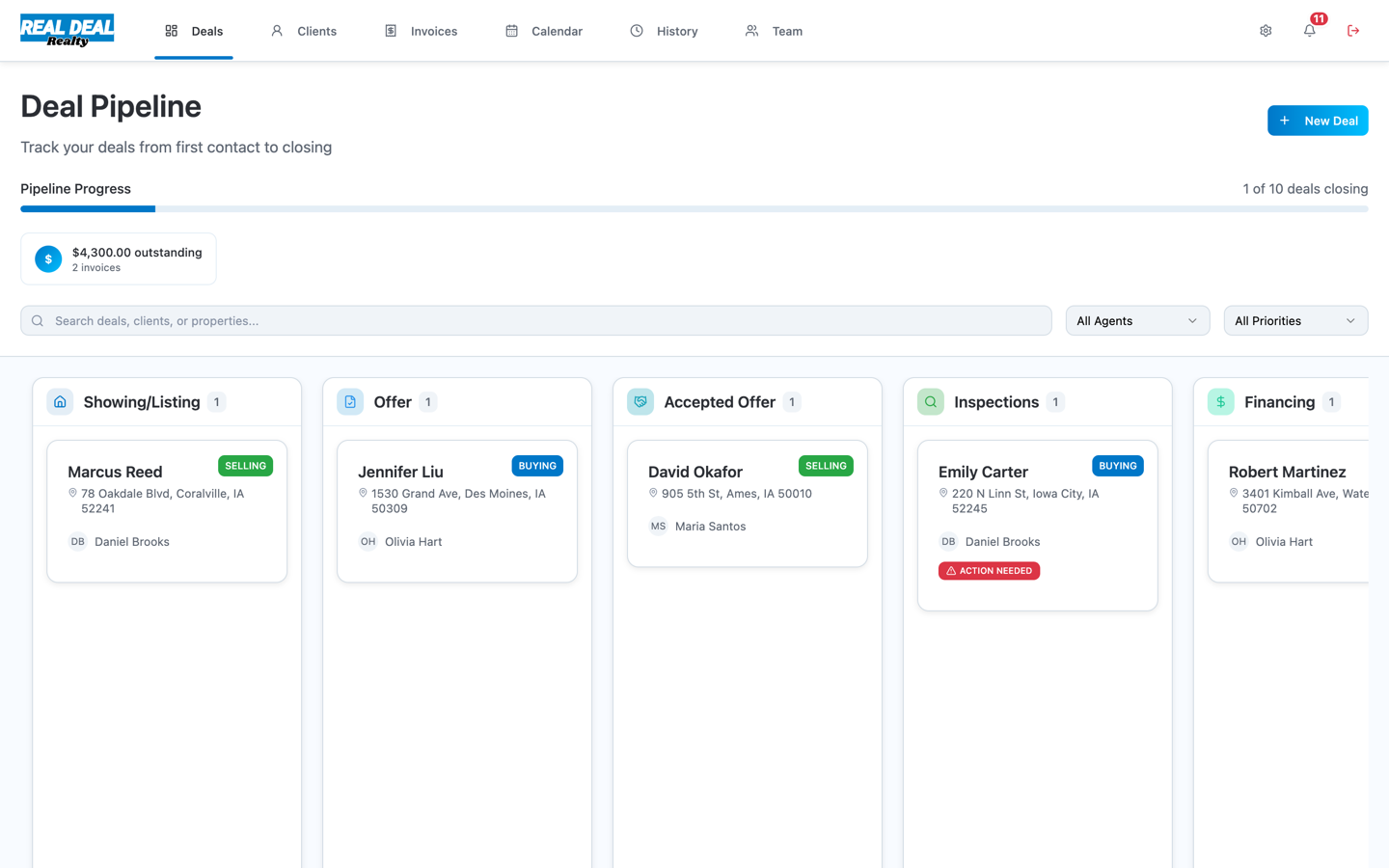
The question you actually ask on a Monday is "what needs me this week". That is a board question, not a folder question — you want every live deal in one view, grouped by where it has got to.
What dotloop’s own pages say
“Unlimited Transactions”
— www.dotloop.com/products/plans-pricing, read October 19, 2026
In Real Deal Pro
- Deals sit on a seven-stage board from Pre-Contract through closing, and dragging a card moves the deal — the stage is the deal’s state, not a label on top of it.
- The Free plan carries 3 active deals; Solo and Team are unlimited.
6. Invoicing and getting paid
Referral fees, transaction-coordination fees, marketing rebilled to a seller. The job is to send an invoice that references the deal it came from, let the payer pay it by card, and know when the money arrives — without exporting anything into accounting software.
This is the third subscription in the usual stack, and the one with the least excuse for being separate: the invoice is about a deal whose amount, address and client are already recorded somewhere else.
In Real Deal Pro
- Invoices are raised against a deal and sent as a link the client opens and pays without an account.
- Paid status updates itself when the payment settles — there is nothing to reconcile by hand.
7. Working as a team
The moment a second person touches a deal, you need to know who is allowed to do what — and to be able to hand a transaction coordinator the whole file without handing over your login.
What dotloop’s own pages say
“Dotloop for Teams offers the ability to “act on behalf” of your agents while tracking who completed what action.”
— www.dotloop.com/products/plans-pricing, read October 19, 2026
“GET CUSTOM PRICING”
— www.dotloop.com/products/plans-pricing, read October 19, 2026
In Real Deal Pro
- Four roles ship in the product — Leader, Transaction Coordinator, Team Realtor and Independent — and a coordinator can run every deal without holding billing or ownership powers.
- The Team price is published rather than quoted: $99 per seat monthly, or $79 per seat when billed annually.
Free
$0
Free forever, up to 3 active deals
Solo
$59
or $49/mo billed annually
Team
$99
or $79/seat/mo billed annually
8. Handing the closing file to your broker
At closing somebody outside your workspace — your broker, a compliance reviewer, sometimes a title company — has to receive the complete file and be able to tell at a glance whether anything is missing.
What dotloop’s own pages say
“Gain real-time visibility into all deals, create custom review stages and standardized transactions with custom loop templates to make compliance fast and easy.”
— www.dotloop.com/products/plans-pricing, read October 19, 2026
“Automated Compliance Workflows”
— www.dotloop.com/products/plans-pricing, read October 19, 2026
In Real Deal Pro
- A closing binder assembles the deal into one link with a cover sheet and a completeness check, so the reviewer sees what is present and what is outstanding before opening anything.
- The link is read-only, expires, and needs no account on the receiving end — your broker does not have to be a user of your software.
Also included in Real Deal Pro
These are parts of the workspace that do not map onto a single job above. They are listed because they are included, not as a statement about anyone else’s product.
- One deal record feeding CRM, pipeline, documents, tasks, calendar and invoices — one login, one bill, no per-deal fees.
- Deal history you can scroll: who changed what, and when.
- A reusable template library shared across the workspace, so a team fills forms the same way every time.
66%
of agents surveyed named saving time as a reason for adopting new technology — the most-cited reason in the survey.
Support and resources
Support is email-first at support@real-deal-pro.com, and we aim to reply within one business day, Monday to Friday. If something is blocking a closing today, put URGENT in the subject line and it gets prioritised; there is a same-day phone line for closing emergencies, with voicemail outside business hours.
The Help Center covers getting set up, mapping your first template, and inviting a teammate. Privacy and data requests go to privacy@real-deal-pro.com.
Real Deal Pro, Inc. is a software company and is not a real estate brokerage. Every plan is software only — you keep your own brokerage.
What it costs over a year
The monthly figures are easy to shrug at. A year of them is not, which is why the comparison worth making is annual and includes every tool the job actually needs. The stack figure sums each vendor's own published annual price, on the same billing term as ours.
Try it before you decide
The Free plan is a live product tier, not a countdown: up to 3 active deals and 100 clients, with contract generation and e-signatures included. No credit card.
Free plan · No credit card required · Upgrade anytime · Set up in 5 minutes
Wrapping up
The honest summary: dotloop and Real Deal Pro both get a contract signed. The difference this page is really about is how many other tools you still need afterwards, and what the whole stack costs once you add them up.
If transaction management is all you need done, and you already have a CRM and an invoicing tool you like, that is a legitimate answer. If you would rather the client record, the pipeline, the forms, the deadlines and the invoices share one deal — and you would like to try that for nothing before deciding — the Free plan is a live product tier, not a countdown.
Sources
Every statement about dotloop on this page is quoted from the pages below, on the date shown. Prices and features change — verify with the vendor.
- dotloop — Real Estate Agent, Team and Broker Pricing — www.dotloop.com/products/plans-pricing, read October 19, 2026